Deployment Topologies
Companions:
- Client SDK — the in-process SDK that every topology below is built around.
- Routing & API — the current server-function transport and the conditions under which a stable HTTP API becomes worthwhile.
- Transports — the planned layering of framework-agnostic logic under host-specific bindings, which is what makes the split topologies possible.
- Caching — the cache layers and invalidation strategy that change shape once a network boundary appears.
Byline runs today as a single application: the admin dashboard and your front-end share one host, and content is read through @byline/client as an in-process function call rather than a network request. This document describes that arrangement, and the three progressively more distributed arrangements Byline is designed to grow into. Read it when you are deciding how to deploy Byline, or assessing whether a topology you eventually need is one the architecture can reach.
Only the first scenario is available today. The other three depend on a stable public HTTP API, which is deliberately deferred; see Status at the end of this document.
What stays constant
Every topology below is a rearrangement of the same four parts, so it is worth naming them before the diagrams:
The constant across all four is that the SDK is always in-process with the core runtime. Byline does not have a mode where the SDK itself talks to a remote server; a network boundary is introduced by putting an HTTP API in front of an in-process SDK, never by splitting the SDK from the runtime it calls.
Scenario 1 — Integrated all-in-one host
Available today. A single host runs the admin dashboard and the front-end application together. The Client SDK runs in-process and the host talks directly to Postgres. The host can still be clustered: multiple identical instances behind a load balancer share one database.
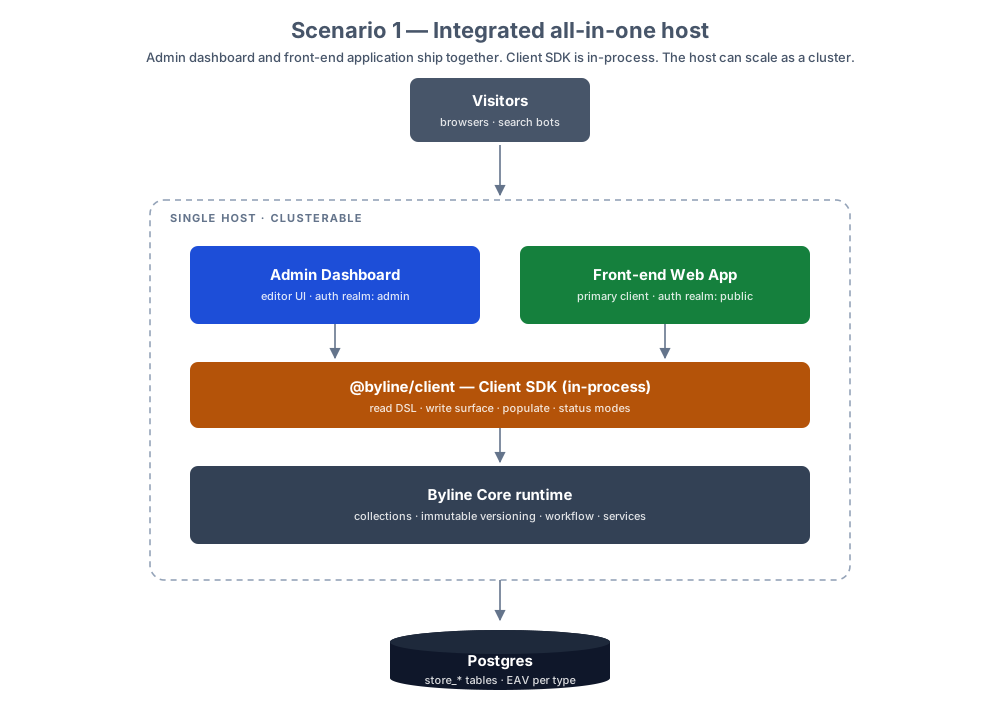
This is the shape the reference application (apps/webapp) and the CLI installer both produce. It has no network hop between the front-end and the content it renders, which is why reads are function calls and the SDK can be typed end to end against your generated collection types.
Scenario 2 — Integrated host with an exposed HTTP API
The same single host additionally exposes a public HTTP API whose routes map 1:1 onto the Client SDK surface. The front-end keeps calling the SDK in-process (it gains nothing from crossing the network to reach its own host) while mobile applications, other frameworks, and partner integrations reach Byline over HTTP.
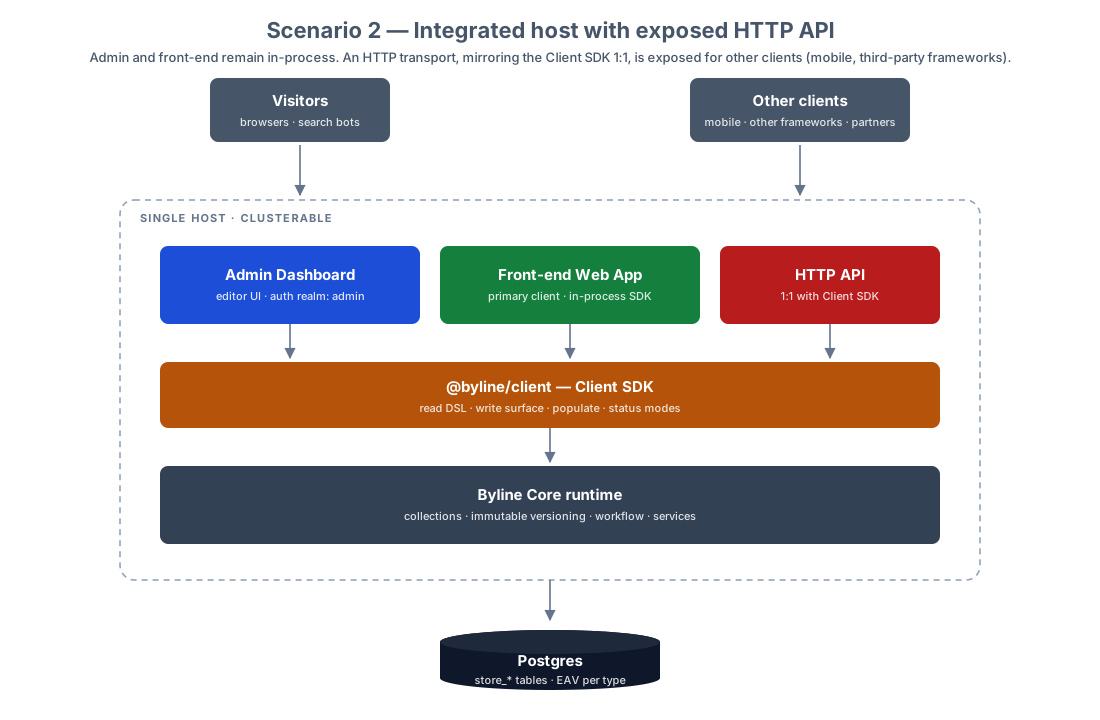
The 1:1 mapping is the important constraint. The HTTP layer is a transport over the SDK, not a second content API with its own semantics, so query behaviour, populate, and status modes stay identical whichever way a client arrives.
Scenario 3 — Byline host with a separate front-end host
Two hosts. Host A carries the admin dashboard and exposes the HTTP API; the front-end is deployed and scaled independently on Host B, consuming that API over the network.
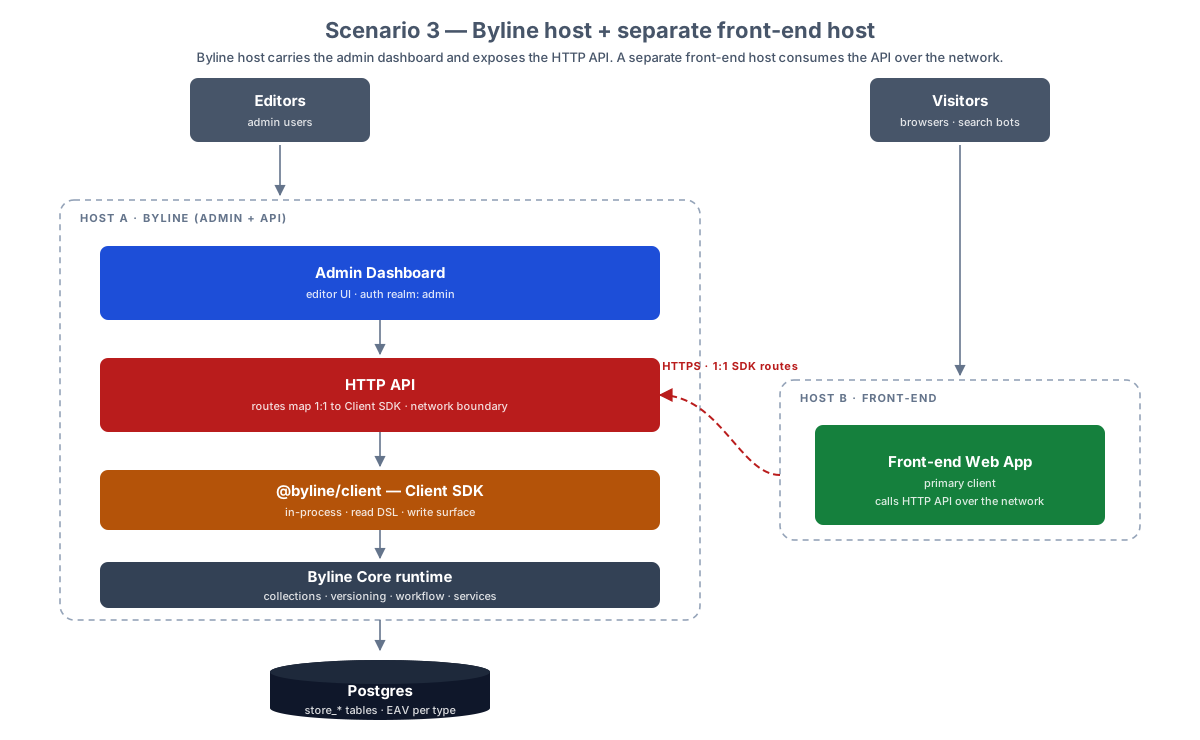
This is the first topology where the front-end pays a network cost per read, and therefore the first where caching stops being an optimisation and becomes part of the design. It suits teams who want to deploy and scale the public site on a different cadence (or a different platform) from the CMS.
Scenario 4 — Three dedicated hosts
Three hosts, each with one job: a dedicated HTTP API host, a dedicated admin host with no exposed HTTP surface, and a dedicated front-end host. The front-end consumes the API host over the network; the admin and API hosts share one Postgres database.
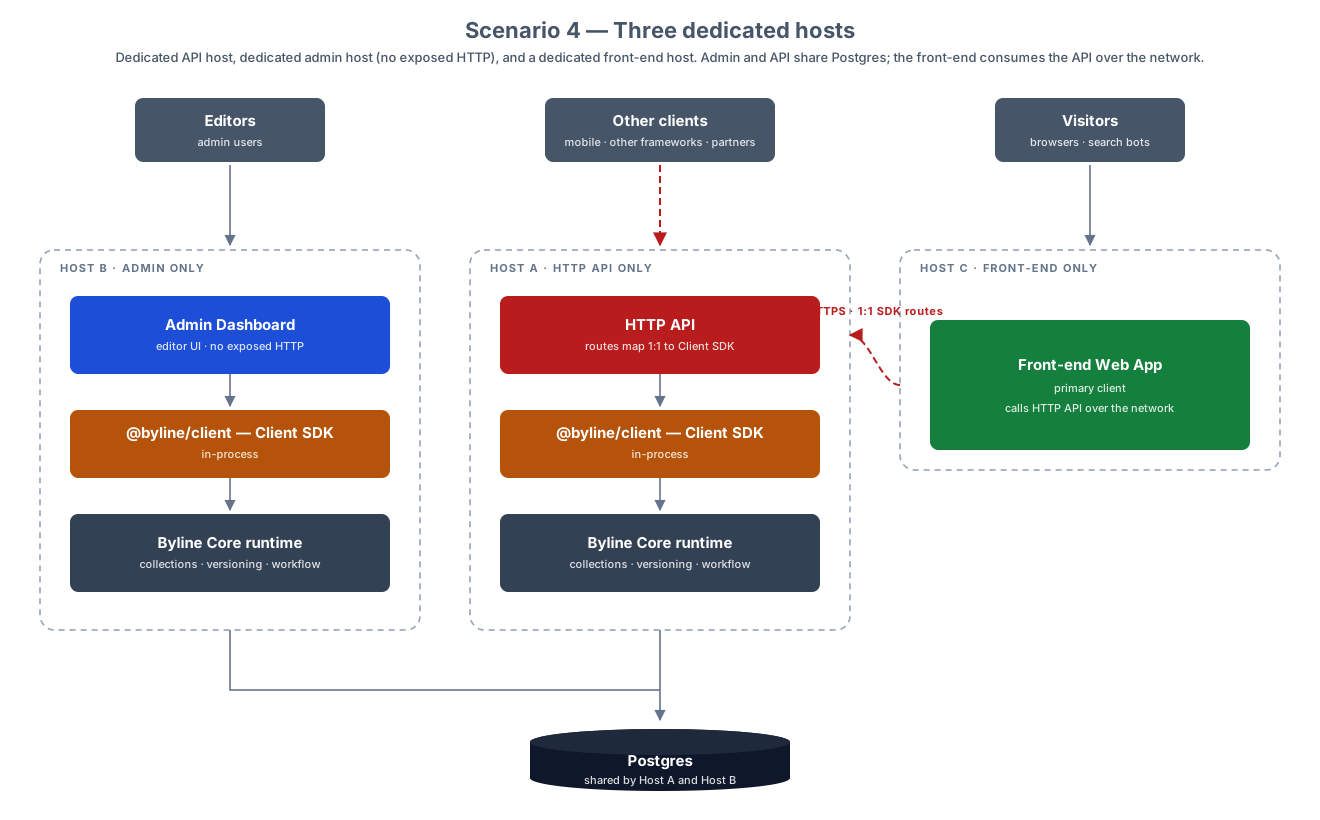
Both Byline hosts run their own in-process SDK and core runtime against the shared database, consistent with the rule above that the SDK is never split from its runtime. The admin host exposing no HTTP surface is the point of this arrangement: the editor application can sit entirely inside a private network while the API host is the only publicly reachable Byline component.
Status
Scenarios 2, 3, and 4 all require a stable public HTTP API, which Byline does not yet expose. The only client today is the admin UI, so collection operations are handled through TanStack Start server functions rather than framework-agnostic HTTP endpoints. That boundary is deferred until a second, non-admin client exists to design it against; see Routing & API for the reasoning, and Transports for the layering that would carry it.
The diagrams describe an intended progression, not a roadmap with dates. Treat scenario 1 as the supported deployment and the rest as the shapes the architecture is being kept honest against.