Analytics
Companions:
- Configuration — packages, database adapters, migrations, registration, and scheduler setup.
- Browser agent and consent — serving, loading, configuring, and conditionally enabling the browser collector.
- Ingest and deployment — application-owned routes and request identity for direct, platform, and trusted-proxy deployments.
- Storage, rollups, and operations — daily identities, retention, dashboard queries, monitoring, and conformance tests.
- Scheduling — the recurring-task runtime used by analytics maintenance.
Byline analytics is an optional subsystem for page views, daily unique visitors, and downloads. A small browser agent sends an event to a same-origin route chosen by the application. The server derives a daily rotating visitor hash and stores the event through a PostgreSQL or MySQL adapter.
The standard behavior sets no cookies, stores no raw IP addresses, and creates no identity that survives a UTC-day boundary. This is product telemetry rather than an auditable traffic ledger. Anonymous clients can forge events, in-memory replay suppression is imperfect across application instances, and a multi-day visitor number is the sum of daily unique counts.
Package boundaries
The portable packages do not register an HTTP route, choose a URL, inject a script, start a timer, or assume a reverse proxy. An application may use the TanStack helpers, provide equivalent integration code for another host, or bundle the browser API directly.
The @byline/analytics root is server-only because hashing uses Node.js cryptography. Browser code that needs shared limits or dashboard periods imports the browser-safe @byline/analytics/config subpath.
End-to-end flow
- The application decides whether and where to load the browser agent.
- The application supplies a same-origin ingest endpoint such as
/telemetry/events. - The agent reports
{ v, kind, path, ref }withsendBeacon, falling back to a keepalivefetch. - The host resolves request-scoped network facts using its own runtime or deployment topology.
- The portable ingest contract validates the event, derives a daily visitor hash, suppresses a short replay, and inserts the event.
- Dashboard queries combine current raw events with completed daily rollups.
- A recurring task rolls up completed UTC days and applies retention.
The dashboard offers 7-, 30-, and 90-day reports, year to date, and all time. All time begins at the earliest day available in either retained headline rollups or raw events. Headline and country history is indefinite; a dashboard labels path, download, or referrer lists when finite aggregate retention gives them a later coverage boundary.
Browser agent and consent documents the exact browser-side event rules. Ingest and deployment lists every value received and the validation order. Storage, rollups, and operations maps accepted values to SQL columns, aggregate tables, dashboard results, and retention.
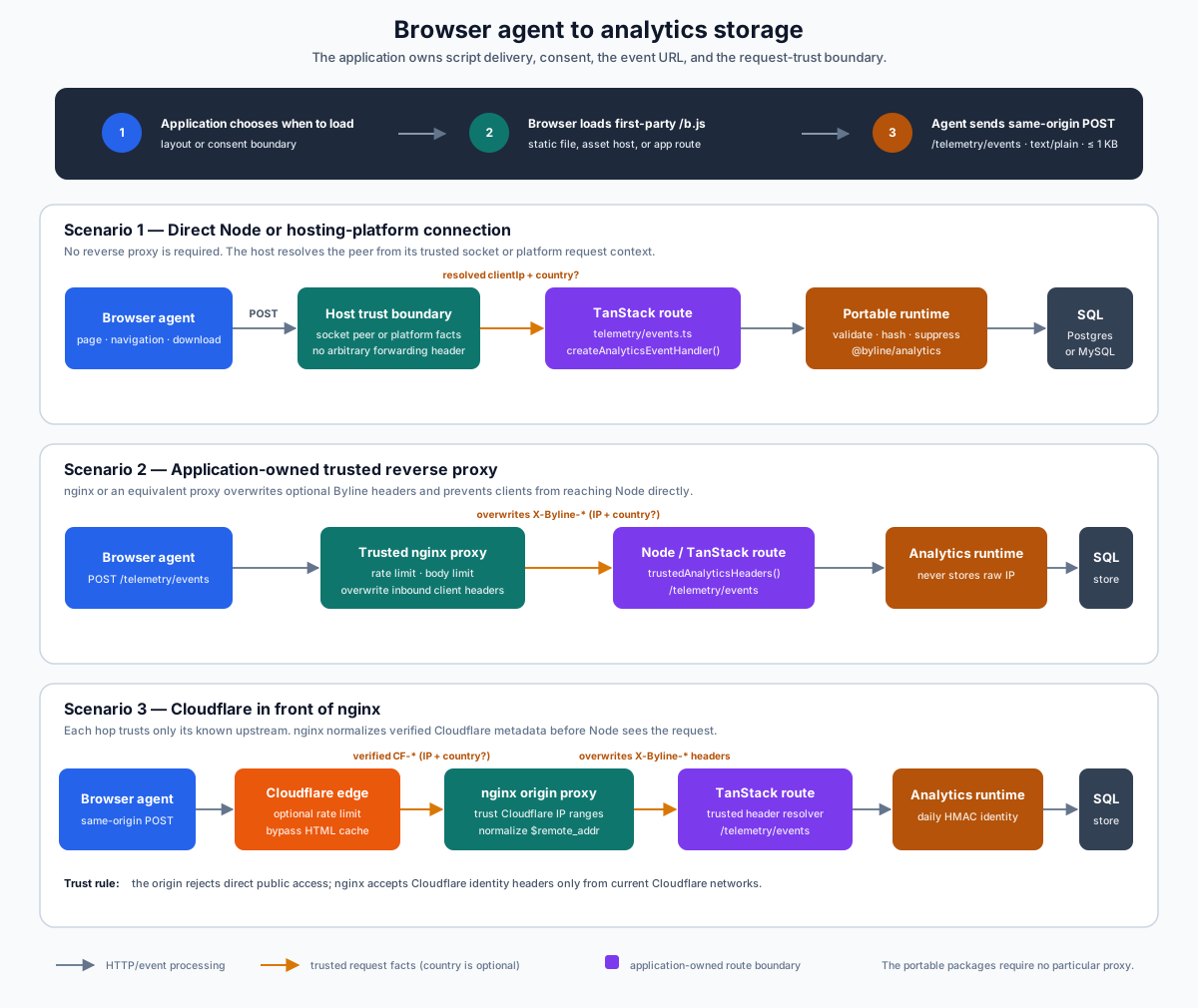
The reference application selects /telemetry/events and implements it in apps/webapp/src/routes/telemetry/events.ts. That is an application-owned telemetry namespace, not a public Byline content API and not a path imposed by @byline/analytics-agent. A downstream application can choose another same-origin path and pass it to the agent.
Analytics needs one narrow, anonymous, write-only HTTP ingress because a standalone browser script must reach the server. That endpoint is application-owned and is not a stable Byline document or upload transport. Byline's document and upload operations continue to use host adapters such as TanStack server functions.
Installation policy and data policy
The site owner controls whether analytics is enabled, whether consent is required, where the agent is served, where events are accepted, and how request facts are obtained. The package keeps its declared data behavior strict: it never persists raw client addresses, never writes a tracking identifier, and never trusts arbitrary forwarding headers.
A deployment must describe its actual use in its privacy notice. createAnalyticsPrivacyStatement() supplies editable starting copy, not legal advice. A site that changes the identity model, retains raw addresses, or links visitors across days no longer matches the standard Byline analytics behavior described in these documents.